
=VG= SemlerPDX
-
Posts
4,944 -
Joined
-
Last visited
Content Type
Profiles
Forums
Events
Downloads
Gallery
Articles
AVCS Bug Reports (automated)
AVCS Bug Reports (manual)
VG Wiki
Blogs
Store
Everything posted by =VG= SemlerPDX
-
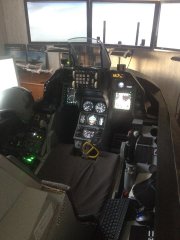 Fred Maillochaud shared this picture of his amazing home cockpit setup for Falcon BMS. This thing is absolutely beautiful! Those who fall in love with the best F-16 sim in the world know that you could fly Falcon BMS with a mouse and keyboard, but there is nothing cooler than never having to touch either one during a flight!
 -

Accused Geek of bad server etiquette and I was wrong
=VG= SemlerPDX replied to Static's topic in Help/Support
Yea, seems like certain Human-only squadrons are getting fragged by HQ again for some reason, which is likely a game bug to err on the side of caution. -
@Sarge55 Here ya go: https://www.dropbox.com/s/q9oux3j3f8t75en/Acdata.zip?dl=0 Delete the folder "Acdata" and unzip the above folder to the same location. (Program Files)\Falcon BMS 4.33 U1\Data\Sim

-
 Wow!! Nice construction! That's a decent sized smelter, too!
 -
As i'm feeling extremely patriotic today...
=VG= SemlerPDX replied to =VG= Sausag3's topic in Militaria
can't..... resist.... python reference.... AAAAHHHH!!- 17 replies
-
- 3
-

-
- grenadiers
- army
- (and 2 more)
-
As i'm feeling extremely patriotic today...
=VG= SemlerPDX replied to =VG= Sausag3's topic in Militaria
Very impressive! Now I'm gonna feel bad if I make any jokes... It seems that chinstrap is fucking up the one thing that a chinstrap is supposed to do. And I'm surprised that they take personal care of their Q-tips - you'd think given the history of the Soldier and Officer classes in the British Military, they'd have a designated Bearskin waif to clean them all while the men drink bitters and play billiards.. (ba dum - tiss) (I said I'd feel bad, didn't say I wasn't gonna make any jokes!) aw, now I feel bad cuz those guys are really cool- 17 replies
-
- 2
-
-
- grenadiers
- army
- (and 2 more)
-
*request runway* ^using that as a command for "When I say..." will make it so that any sentence that CONTAINS those words will fire the desired command. Note the asterisks on either side of the entire sentence. Very similar to the example I posted before. It's also worth noting that the developer of Voice Attack states that wildcards using asterisks like I've shown are "somewhat unsupported" and therefore can be problematic - care should be taken whenever using them. The actual quote from the guide:
-
You'll obviously have no trouble finding the comms hotkeys and/or create simple macros for these commands, so there will be keypresses and you'll need to know those keys. Then there's the actual "call" commands for each action - of course you can make it a full sentence(s) "Request Landing Clearance" and that will work just great. But if you want a wee bit more variety and options to how you say that, you can add a few dynamic choices for VA to recognize, and also a few recognition inclusions for words that "sound like" words in your command so you don't find yourself repeating your command over and over. Here's my request landing command -- the asterisk* at the beginning means that ANYTHING I say that ends with this bit will register like, "Osan Tower this is Cowboy 1-1, requesting landing clearance" **BE SURE TO USE PAUSES BETWEEN KEYPRESSES! At least 0.050 and sometimes as long as 0.50 depending on the game -- some games can run super fast macros, some are old and need longer pauses. Explanation of Symbols and Structure of a Dynamic Command such as the one above: ; <- a semicolon is a separator meaning "or" so that you can have more than one choice for command word(s) or sentence(s). Note that either of those dynamic statements will call the command. ^ABOVE IT IS HIGHLIGHTED IN RED! [word1;word2] <- either word can be used, but at least ONE of them must be spoken [word1;word2;] <- either word can be used, or neither at all *request landing <- any sentence ending with "request landing" will execute this command request landing* <- any sentence beginning with "request landing" will execute this command So, there's much depth in Voice Attack, and I hope this little bit prepares you for the few things you'll like to do for your Falcon BMS voice commands. Any questions, feel free to ask! Good luck!
-
Yes - you want to use Voice Attack which uses Windows Voice Recognition. Pick up Voice Attack here: https://www.voiceattack.com/
-
Thank you for hosting the event TEDF! What a great turnout!
-
He's a legit player as far as I can tell, plays off and on since July 2017, first seen in June. Not too many Admin warnings, minimal teamkilling (and apologizes afterwards), and generally seems like just another regular player. His most frequent times seem to be 1600 ZULU through 2000, I didn't note the days of week/etc. but I believe you should just talk to him. Maybe try chat first, not sure if his mic is working or if there is a large language barrier, but he does appear to speak English and he is in Indonesia. Just ask him kindly - maybe it was a mistake, or maybe he pushed the button to see what it did and it claimed the name to his profile. Pretty sure you can just "claim" the name back to you on the Gametracker website. But I doubt it was anything malicious. Feel free to report back.
-
Well done, sir!
-
Thank you very much, Cobalt! I thought I was gonna be flying today, and my body was all "I don't think so, bucko!" - it's 6pm and I'm finally feeling better, so I'm hoping and praying I'll be there tomorrow. I LOVE the first days of the war!! Dodging SAM's and chucking spears at MiG's -- a little piece of heaven!
-
Definitely would like to see how this plays out. Jeffu and I hit some tank battalions in East Pyongyang and some A-10C's were also dropping bombs in the area. Static said he's been hoping to see this one to the end as well, so let's keep up the pressure!
-
Thanks for the notice! I've updated the server, it's back online, we tested mumble, all is well.
-
Announcement added here to website, upcoming calendar events added to home page (which would be an easy place for people to comment "I'll be there"), PR COOP TS3 Channel Description, and in-game MOTD updated, I assume it will go live on next server restart or maybe next mission load: "WELCOME! Join us November 11th 2017 for a Public PR COOP Event! Details at VETERANS-GAMING.COM" edit: when I updated the server just now, I did a mumble test with Kenji (who was in TS3) - before I left, I asked "you gonna be at the Event?" and he hadn't heard of it. Like Kav said, so many don't come to the website, so when you're playing, ask your friends and the people you play with if they are going to attend - if they've not heard of it, it's a good chance to direct them here to the website. I'm sure more than one will be impressed with the Mission Briefing that TEDF has prepared and we'll get more people joining it if we hype it a bit in-game over the coming weeks.
-
I will update the in game Message of the Day with a promo for the event. I will also put up an announcement here at the website linking to this thread. I've already added it to the calendar here, but it's not used and not pinned to the home page.. I might find a space for it above the chat. Kav and I were talking about hosting weekly training events for various games, not just PR, and the calendar would help with that. Anyway, didn't mean to get off topic.. We'll get some active promotion going for this event.
-
Because GameTracker is not perfect. It is a known bug in GameTracker - do not worry about it. All of those players are legit (except FastJack - he really is a bot )
-
Thank you for that clarification! Just wanted to know what I'm signing up for beforehand
-
So... this will be a PvP event?
-
No offense, but I'd still like to hear from Double what HE meant by this...
-
What exactly is that supposed to mean?
-
Finally located a picture of my Henry Repeater .45 Long Colt on my Imgur. (mags are from my Glock 17) This pic is from 3 years ago when I went up to the mountains for target shooting:

-
-
2
-
- Report
-
Arma 3 - Report Rule Violations Here
=VG= SemlerPDX replied to =VG= SemlerPDX's topic in ARMA Player Reports
Are you unable to ban them? Please just ban them if you can. -