
=VG= SemlerPDX
-
Posts
4,965 -
Joined
-
Last visited












About =VG= SemlerPDX

- Birthday 06/04/1979
Recent Profile Visitors


.thumb.gif.fcbb8dbcea7219cd3c1bf51a19900ba0.gif)


=VG= SemlerPDX's Achievements

Major General (16/18)
6.4k
Reputation
-
Just say, "Enable Audio Feedback Mode" If that is not what you mean, I wonder if you mean a sound effect whenever you PRESS and also when you RELEASE the VHF and/or UHF buttons on your flightstick? I can only ask, if my voice command above was not what you are looking for.
-
Hello and welcome to the VG Army!!
-
I need to share this here as well, for those who know me and may not have read my post on VG Discord - this is a copy of it for the most part cuz I can't keep typing this out over and over.
This past Tuesday, I found my Uncle unresponsive in his chair watching TV when I went inside for coffee. I did CPR as the ambulance came. He was in his 70's, my mother's brother, raised my like a father. He was 70, but in good health. He didn't drink heavily, he didn't smoke, he didn't do drugs.
I'm all alone now. First my (only) brother died back in 2017, then family friend Nancy this xmas, then Cousin John just after, then my mom passed away on hospice just 5 days ago, and it was only a last weekend that Uncle Mike contacted the funeral home ... I don't even know which one, she's not been cremated yet. [update: the funeral home with mom called my uncle's phone and I got in contact with them]
Now I'm all alone. One surviving friend of the family came over, I was able to google his number - I've known him my entire life, he's like a second uncle. He has been a massive help this week, and will be helping me out in the coming weeks. He's the only one who knew Nancy, John, my mom and uncle, and me and my (deceased) brother.
I also have my kid (27, married) in Missouri, and her mother (and his husband) - we're all friends. Life has majorly shit on me, and I'm gonna spend a lot of time escaping between dealing with all of this in the coming months. I have never been so fucked so many times in a row in my life in such a short period, this doesn't seem real. I keep expecting to wake up. I will be escaping online even more in the coming months between dealing with all of this. I'm numb.
I will get through this, but I am obviously super fucked up right now - spending time dealing with this, and then escaping online to try to feel "normal" for a few hours. I'm getting by one hour at a time in that fashion... when things get too heavy, I escape for a little while.
Also wanted to say don't worry about me: I also don't drink, don't do drugs, and won't let this curl me into a ball of pity and remorse - but I am definitely strained to my maximum limit.-
-
 2
2
-
- Report
-

My condolences for your loss this year, we all here for you (if you need someone to talk/chat about it).
Stay strong, brother! Every trial and struggles has its silver lining.
-
-
 1
1
-
- Report
-
Hello and welcome to the VG Army!!
-
I have no idea why you are not already an Enlisted group member, I see that you joined the VG Army Club back in January of 2025. I'll add you to the group now, and you'll be able to access that applications form. Just give me a few minutes.
-
 Changed Severity / Status to Non-issue
 -
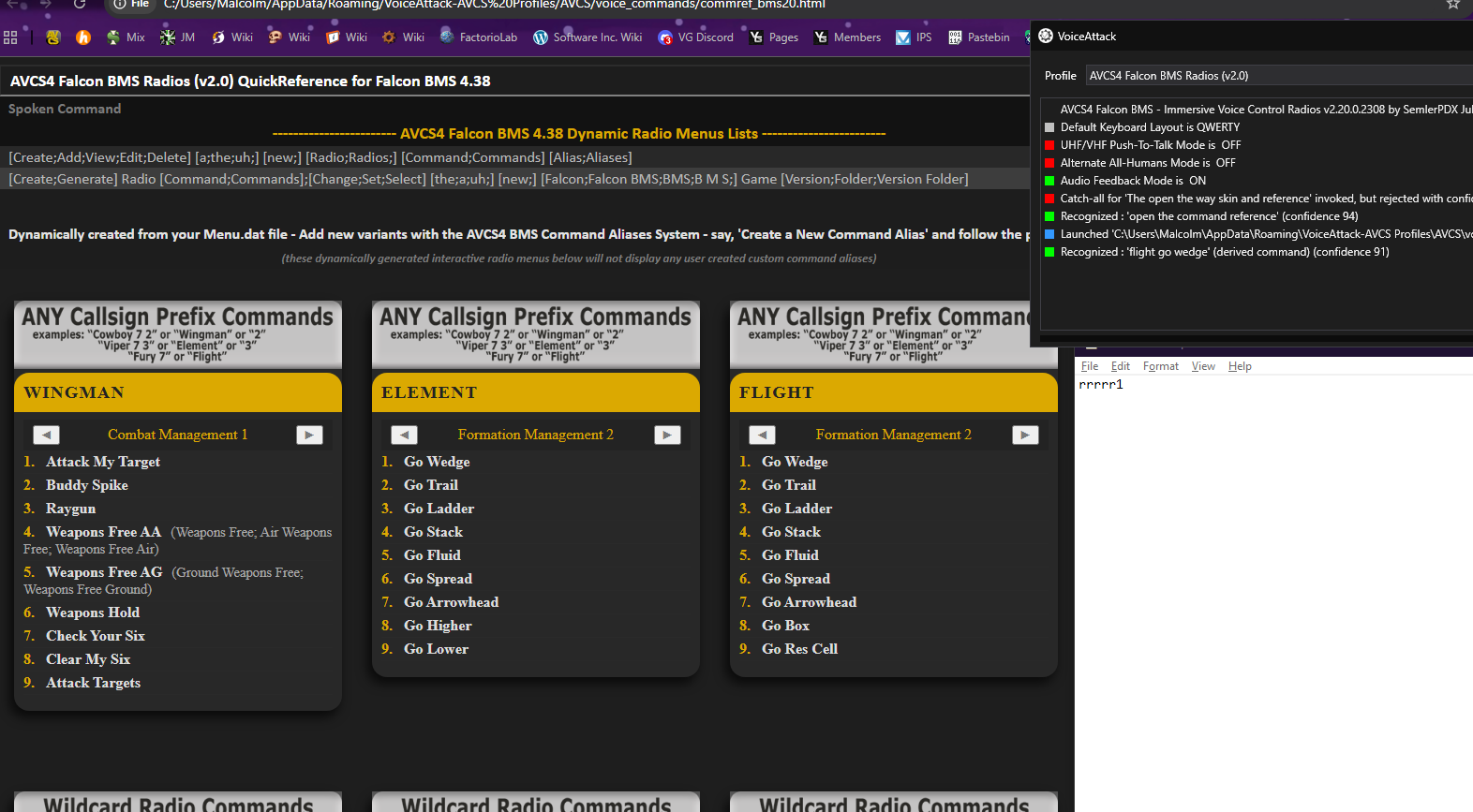
You have VoiceAttack as the application in focus, with the target for text interaction as the profiles list. When you issue this command which presses the "R" key (for Flight), what is happening is the profiles list is recognizing your "R" keypress to jump to and load the first profile that starts with the letter "R". If you instead open a Notepad and place the cursor there, and issue the command, "Flight Go Wedge", you would instead see the letter(s) "R" typed out followed by the number "1" as pictured below: The solution would be to test this while you are actually flying in Falcon BMS and when BMS is the active window, so that virtual keypress macros send keys to this application and NOT to the VoiceAttack application. If you have any other issues, please feel free to let me know!

-
RIP cousin John Smith 7/3/1941-1/24/2026
He'll live forever in our memories of the Hot Springs Fork in Mt. Hood National Forest.

-
-
1
-
- Report
-
AVCS4 Voice Control Radios for Falcon BMS
=VG= SemlerPDX commented on =VG= SemlerPDX's file in VoiceAttack
 You'd have to ask people over on the Falcon BMS forums about the radio menu and configuration options related to it. This information may also be available in one of the many BMS documents found in your program folder for this simulator. Pretty sure it's just a line you alter or add to your user configuration file, but I don't want to assume. There was a post just today regarding changing the radial menu back to list menus: https://forum.falcon-bms.com/topic/30716/comms-pie-menu
 -
AVCS4 Voice Control Radios for Falcon BMS
=VG= SemlerPDX commented on =VG= SemlerPDX's file in VoiceAttack
1. You can hide the radios menu, you can change it from a radial menu back to a list menu, and you can even reposition it offscreen. Do whatever you feel is best for you. 2. If you are from a culture that expresses Pi such as "3,14" instead of "3.14" (for example), using a comma as opposed to a period/full-stop, then the keypress timing decimals of 50 milliseconds are getting translated into 5 seconds (or more). Because my profile was created in English culture, the only workaround I presently know is to switch your Windows OS culture or perhaps keyboard to US/UK or something. I'm not sure of the exact process because again I'm not in such a region/culture so I don't know what to do. If you ask around other AVCS4 users from your region, they will know. Running both BMS and VoiceAttack as Administrator is just fine. It's not ideal, but then, not many workarounds are. No idea why you'd need to run BMS as Administrator unless it relies upon something else which itself is also running as Administrator. As you might now suspect, this "chain" of processes running in elevated permission states affects all others that interact with it. If possible, eliminating ALL elevated permissions of any/all running software might make it possible to once again run BMS without these elevated permissions, but I cannot assume your setup and there is way too much nuance to troubleshoot here. Best wishes and good luck! I'm here if you need help! -
AVCS4 Voice Control Radios for Falcon BMS
=VG= SemlerPDX commented on =VG= SemlerPDX's file in VoiceAttack
If you are running Falcon BMS as Administrator, then yes, it may be required for you to run VoiceAttack as Administrator as well. The solution would be to not run Falcon BMS as Administrator - this is not required. -


Just released the first episode of my playthrough on Mars in the latest version of Stationeers!! Check it out here, and let me know what you think!
I want to make more episodic content, to fit more than a 20-minute Martian in-game day into one episode, and to keep the video lengths close to the 25 minute mark. I spent a lot of time testing different formats, and i really hope folks enjoy this structure!-
-
 1
1
-
- Report
-

That's pretty cool.
-
-
1
-
- Report
-
Changed Severity / Status to Resolved (live update pushed to all users)