
=VG= SemlerPDX
-
Posts
4,968 -
Joined
-
Last visited
Content Type
Profiles
Forums
Events
Downloads
Gallery
Articles
AVCS Bug Reports (automated)
AVCS Bug Reports (manual)
VG Wiki
Blogs
Store
Everything posted by =VG= SemlerPDX
-
Looks like one of them died while bustin' a move!
-
No, it's Day 7, just checked the server and appears to be running fine. Haven't restarted with proposed change because of what you wrote about your workaround and what Brain wrote when I asked about the problem... I'd be happy to roll it back to day one with the proposed change when you all want. Just let me know
-
*you seem to have left out a CPU cooler - you cannot use the stock Intel CPU cooler that comes with it, you must get something. Air cooled is cheaper, but can be noisy. Liquid cooled is a little more expensive, but helpful for noise and a little more room in overclocking projects. You'll wanna buy Artic Sliver as well for a thermal compound between the CPU and the cooler. For that matter, you should buy or order some rubbing alcohol - the closer to 100% the better, helps in evaporation time of the water mixed in (if any).
-
Yea, mectus is in Tunisia, North East Africa.... Building a PC might be the cheapest route for him. The anti-static wrist strap makes sure you don't shock the little sensitive electronics in the case while you install things. There are a few steps to ensuring a proper ground, and I've put a link to instructions on Tom's Hardware, which is where you wanna get your best info from on a number of PC topics from best parts to How To's. A little moral and legal disclaimer (gonna just copy Tom's): Warning: Building computers can be very dangerous. Make sure you know exactly what you are doing. If, after reading this, you either damage your computer, burn your house down, or kill yourself, you or your next of kin cannot sue me over it. TLDNR; small static shocks can kill PC parts - you must ground yourself and your PC build as you go... How To: First put on your anti-static wrist strap, connect it's wire clamp to the case somewhere with NO paint, now ground yourself and the case by touching something in your house that you normally would get a "static shock" from, like metal in a door frame, or the metal screw on a light switch or power outlet cover. You and the metal case are now (for just now) at a near Zero static charge, now you can take the motherboard out of the box knowing you won't send a shock through it. Don't go shuffling your feet on the carpet until we've installed the PSU... The motherboard may have built up a charge itself from plastic or packaging materials so they ship them in anti-static bags. Once you and the case are grounded, you can pick up your motherboard and take it out of the anti-static bag, and screw it into the case. If you have a laptop, you can have it open to some website like Tom's and follow all kinds of instructions as you carefully build your PC. If you must put your motherboard down before it is screwed into the case, first place it back inside the anti-static bag it shipped with. Next, you install your Power Supply Unit, but before you connect it to the motherboard, or anything, make sure it's switch is in the OFF position ( O symbol) and plug it into a wall outlet. The power supply is now grounded and any charge it may have had is now gone for our purposes. Next you connect the main power cable to the motherboard. At this point, the PSU is still plugged into the wall, and the PSU is in the OFF position, you are still connected to the PC Case by your anti-static wrist strap, you are still alive, and all of these electronics are safely grounded. You can now begin to install chips into/onto the Motherboard, and if you accidentally touch some chip or exposed circuit, it won't fry it. Since there are so many steps in building a PC, you may need to take a break. You take off the wrist strap and leave it connected to your PC case. When you come back to build some more, you put the wrist strap back on, and you are grounded again. If the wrist strap clamp comes off the PC (Happens to me all the time), just re-clamp it onto the case, anywhere that is not painted. People who use "wireless" anti-static wrist straps ensure their case is grounded before beginning work. I prefer the wired wrist straps myself, even though they come unclamped from time to time when moving around the case. As far as parts go, I think you could get an i5 and a faster, name brand SSD (Samsung EVO or PRO, whichever is available and cheaper to you where you are). The Speed increase for a few more dollars spent in either category is worth it, and the difference is minimal, and sometimes better - some SSD's that are slower than Samsung are more expensive, too - but that depends on the sales you can get there in Tunisia I guess... Also, be sure that GFX card is the current generation and not older gen - didn't google it, none of those links can be clicked cuz u posted an image so... be sure it's this year's version or it's a waste of money. Lastly, that monitor setup... looks like you are adding two more monitors maybe the same type as your current monitor in order to have a 3 display setup for FPS games. If so, I would make sure that the total resolution you are intending to push is within the limit of that GFX card (2GB VRAM) -- probably is, but the VRAM on a GFX card dictates the maximum resolution it can handle, mostly coming into play with these new 4K monitors and people trying to run 3 or more of them off one card, but with 2GB just double check your max resolution. Example: (1600 x 900) x 3 would be the max resolution if all three monitors were 1600 x 900. 1080p would be 1920x1080 x 3. But for monitors, I prefer and recommend a fast single monitor with cheap secondary monitors for videos or ts3 or webpages while gaming.. the ASUS VG248 is a kick-ass display capable of 144 FPS, a setting that is always capped by the refresh rate of the Monitor you buy, not by anything fraps or in-game FPS counters tell you. A monitor can only push as many graphical frames to the screen as it's refresh rate is capable of. So, 120Hz monitor can do 120FPS, a 75Hz monitor will only every show 75FPS -- note that Hz number as well as the resolution and response time when buying a monitor. Response rate (lower is better) makes it possible to stare for long time at the screen without eye fatigue (great for snipers). Aim for 0.5-2ms (milliseconds) for response time of a "good" monitor. Again, I've put a link at the bottom if you want to learn more. http://www.tomshardware.com/faq/id-2121341/ground-building-computer.html http://www.tweaktown.com/tweakipedia/89/much-vram-need-1080p-1440p-4k/index.html http://topreviews.best/main-review/best-gaming-monitors?gclid=CLyOw5nB8c4CFURafgodXhkMrg
-
 Awesome pic!!!
 -
The error is only shown under System, Dashboard There was also a red flag beside the name under Members, Members Email Failure Emails are failing to send. View the email error logs or adjust the email settings. If you require assistance with testing your email settings please contact technical support. ***I've verified the email settings, they are all correct AFAIK, so we need to contact whoever can verify root of this issue. For now, we can just check under Members for red flags which we can manually approve. I went ahead and approved Midgee -- it had nothing to do with what he was doing or his spam folder, but that was a good suggestion. We'll figure it out.
-
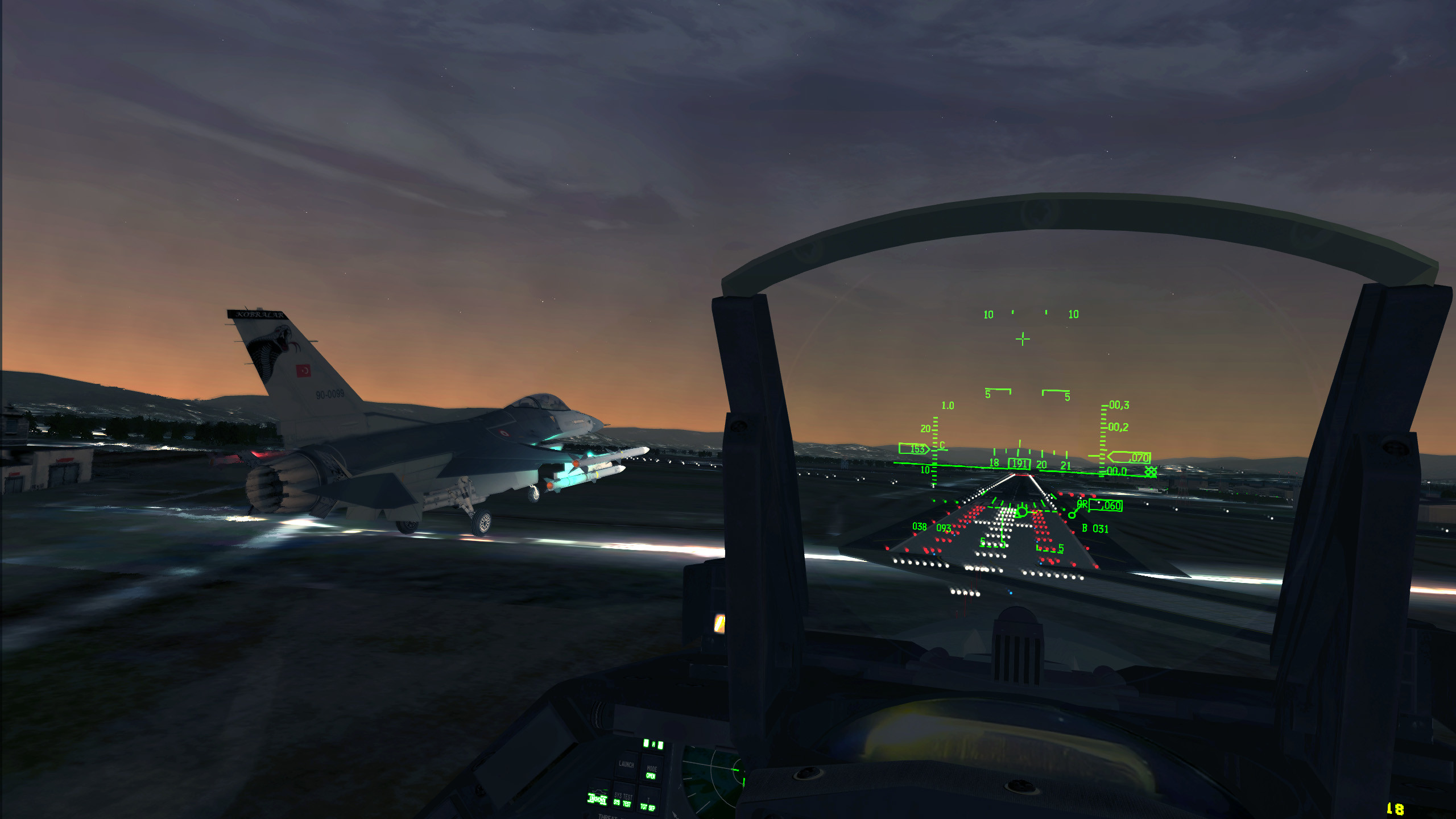
 over 100 people liked this one on the FalconBMS facebook when I shared it on the main wall today. Very cool screenshot, man! Someone asked if it was a different terrain or is that just default terrain in Korea?
 -

computercraft Minecraft ComputerCraft Turtles - How I use them
=VG= SemlerPDX replied to =VG= SemlerPDX's topic in Minecraft
Blaze farm is a full suite of programs meaning the turtles rely on the controlling Computer near them, which might even include a Help program, and it has a startup -- but the majority is not a turtle program... the bit on the Attack Turtles is just a simple one that makes them start attacking if they have a signal from the PC, and sucking the items (and each one "says" something different, printed on it's screen just for the fun of it). The attack turtles loop very slowly checking for a signal before firing their less slower attack loop, and I don't like my computers to loop programs 24/7 at all, so basically the Blaze computer controller returns to a prompt after each "program" command like "on" or "off" or "purge". Would be hard to pastebin link all those bits, but I could make a little tutorial for how I did the blaze attack bot farm and it's computer one day. -
computercraft Minecraft ComputerCraft Turtles - How I use them
=VG= SemlerPDX posted a topic in Minecraft
This is the wily Turtle of Minecraft's ComputerCraft mod: Turtles are computers that can move in the Minecraft world. They use anything that burns as fuel. They can equip a number of tools just like the player, including a Sword. They ignore gravity, are invulnerable to fire and lava and most mobs (they can be blown up though!). They accept computer programs written by the user, or programs written by others can be found on the many ComputerCraft Mod forums. Depending on the mod version, they can have a number of peripheral attachments such as wireless modems or chunk loaders to make them even more functional. They can even be crafted as "Advanced Turtles" with a Gold look and extra fuel capacity. CCCode and I use them for a number of simple tasks like digging a tunnel, digging some stairs down a hole, or other mundane jobs on the VETERANS-GAMING Minecraft Server. Personally, I take it to the nth degree - I use them for tons of things. They are my primary Quarry miners, they help me with basic geometric shapes on huge builds while I work on the details, they farm my crops for me, they are my Attack Bots in my Blaze/XP farm in the Nether, and I'll even get lazy and have them break a few obsidian blocks real quick to save time and wear on my pickaxe when needed. I've written a couple ComputerCraft programs, but mostly I use some great programs I've found over time by other players. I'll add to the content here with pictures, usage examples and basic instructions for those new or unfamiliar with ComputerCraft, and some functional ideas and ways to take advantage of Turtle skillz, but for now I wanted to get the links and descriptions up. I use these turtles so much, I give them names and often miscall them "he" instead of "it" - I blame films like "Batteries Not Included" and "Short Circuit". JOHNNY 5 IS ALIVE!! A Turtle without a name forgets it's programs each time you break it/pick it up - any name will do... examples: Type: label set BOB and press enter (Turtle name will read: BOB) Type: label set Bob 2 and press enter (Turtle name will read: Bob) Type: label set Bob_2 and press enter (Turtle name will read: Bob_2) A newly built Turtle will have no fuel. To refuel a Turtle, place anything that burns in it's inventory... Type: refuel all and press enter (Turtle will display new fuel level) Here is a list of the programs I use, links to their PasteBin pages, and simple copy/paste lines for easy drop-in to your game: Stripmine -- by =VG= CCCode Usage: Stripmine (length) Example: Stripmine 20 (will dig a tunnel 2 wide, 3 high, 20 long) Description: A very simple program he wrote to make a 2-wide, 3-high tunnel through solid material. The mining turtle places a Torch every 6th(?) block on the left wall as he mines down a tunnel with a length defined by the player. It will not know if it is over a cliff or floating in air, or tunneling through a lava flow, so care should be taken when using this Turtle program. It's a simple way to mine ores or create a lighted pathway underground or through a mountain. Pastebin: http://www.pastebin.com/7k8eeCM7 Copy/Paste this line into your turtle: pastebin get 7k8eeCM7 Stripmine Instructions: Place a stack of torches in the Turtle's inventory, in the currently selected slot (the inventory slot with the large square border around it) *Usage Ideas: Quick mining, creating a tunnel from point A to point B, or try using 6 turtles with each two blocks from the other to quickly clear out a huge section of rock for a room or interior. Place a non-block like Bread, Slime, Coal, etc. into it's "Torch" slot to keep it from placing any block at all - useful for clearing out a section of blocks instead of making a tunnel with torches on the wall. OreQuarry -- by AustinKK Usage: OreQuarry (size) (current height in Y) Example: OreQuarry 16 43 (will create a quarry 16 x 16 and the turtle's Y coordinates are 43) Description: A very versatile Quarry program for a mining turtle, AustinKK really took the time to make this program work well. The turtle can be commanded to dig a quarry of any size, and it does so by digging through every other layer down to the bedrock and inspecting the layers above and below it for ores. It will not leave a giant hole in the earth like a standard Minecraft Quarry, but will "swiss cheese" the ground in a more efficient manner. It can even empty the contents of any dungeon chest it comes across, returning the valuable and often rare items along with the ore it finds. A standard Quarry will obliterate these chests, spilling their contents on the ground to de-spawn if I am not mistaken - this alone makes this a more valuable quarry option for the player. It's speed is on par with or even a little faster than a standard quarry of the same size, and has the benefit of working from the bedrock up, as opposed to the standard quarry. This brings the most valuable goodies home first (diamonds, etc.). Can't recommend this enough - worth it to learn. Pastebin: http://www.pastebin.com/3mkeUzby Copy/Paste this line into your turtle: pastebin get 3mkeUzby OreQuarry Instructions: The turtle will mine down, forward and to it's right in a square. Place the turtle where you want the shaft to be, on the turtle's left place a chest with the fuel you want it to use. Behind the turtle, place a chest for the turtle to deposit ores and anything from the quarry. In the Turtle's top 4 inventory slots, place one block each of Gravel, Cobblestone, Stone (cooked cobble), and Dirt. In the very last slot, place one block of the fuel that is in the fuel chest (best to just use coal) and in the slot just left of that coal, place one standard Minecraft chest. A chunk loader is required to keep the turtle in a rendered part of the world for times when you are away or quarry sizes exceed player 'world load radius'- set the chunk loader radius to be slightly larger than the approximate quarry size and place it a few blocks above the turtle's fuel chest. *Note 1: The ore deposit chest behind the turtle will fill up FAST! You must use some form of storage that allows you to pump items out of this chest as it fills to prevent loss of items due to overflow. *Note 2: This program can take advantage of a Flat Bedrock world if that mod is installed, but you must edit the program very slightly - type: edit OreQuarry and press enter -- scroll down a little ways to the first entry local bottomLayer = 5 and change it to = 2 for a slightly faster program run time, though this is optional. It is best to watch his video on how to use it, though the above instructions will get it working. Here is the link to his instructional video: http://www.youtube.com/watch?v=PIugLVzUz3g *Usage Ideas: Since the turtle digs forward and to it's right, with it's fuel chest on it's left and ore chest behind, a total of 4 turtles can share the same fuel chest, each with an ore chest behind them, quadrupling your quarry output from one site. StairsDown -- by =VG= SemlerPDX Usage: StairsDown (length) (optional: stairs) Example: StairsDown 20 (will dig stairs down 20 blocks deep, placing torches every 3rd layer) Example2: StairsDown 20 1 (will dig stairs down 20 blocks deep w/ torches and place stair blocks on it's way back up) Description: Most build programs make things upwards - this is a quick and simple program I wrote to create a lighted staircase Down, of any depth. If desired, actual stair blocks of any type can be placed in the turtle's 2nd inventory slot and it will place them on it's way back up. The stairs will be tall enough for a player to ride inside a minecart if this is the design for the stairs. It is not very versatile and caution should be used as the turtle could get stuck in a cascade of gravel falling or even get it's position data messed up by falling gravel blocking it's movement. Pastebin: http://www.pastebin.com/rjLYah4D Copy/Paste this line into your turtle: pastebin get rjLYah4D StairsDown Instructions: Place a stack of torches in the Turtle's inventory in slot #1. If you want stair blocks placed, put a stack of stairs in the Turtle's inventory slot #2. *Usage Ideas: Simple, quick stairs down to a mining area. Also great for railways -- place minecart rails in the 2nd inventory slot instead of stairs to create a railway down instead of stairs. ....more to come, I will add sections for the other programs I use most feel free to check these out...coming soon, descriptions of: www.pastebin.com/KFVnXPZ1 Tower www.pastebin.com/RAHj4r2K Build www.pastebin.com/26FCDSc9 Farm this is a simple machine power supply controller program I wrote for a minecraft Computer: www.pastebin.com/fw5YpmUf Power
-
Okay - this means we may need to edit the base Day 1 save file one more time... We can turn off HQ fragging for the 908th and 910th so that they don't even go up unless fragged by a human player. This will ensure that they are always available. If this is something you guys want, let me know and I'll make the changes. If you'd like to continue as is and use your "workaround" to frag the Tankers for now, we can let this war go a few weeks before doing another Day 1 restart. It's up to you guys.
-
I see we have an unbeliever in our midst. lol j/k So, I don't watch all the paranormal shows, but I've heard what commercial and military pilots have reported for several decades and that lot is not the "story teller" type, more the "report crazy shit seen out the window of things flying around the cockpit, or hovering near the wing and then near the cockpit, etc. etc." -- and they never seek attention, just report what they saw, no shakey dubious pictures or camera footage, just reports. Reports that get officially buried, pilots told to not repeat the report to anyone. UK even unclassified their volumes of these reports. I've never seen anything definitive, and I star gaze most every summer up in the mountains where there is no light pollution through my little 70mm refractor scope - just lots of satellites, meteors, and stars. But seriously, 99.8% of the aliens people see ARE from Earth - no one here said they were from off planet... Tons of modern eye witness stories have them coming out of the ocean off the coast of Cali - buggers could have entire underground cities for all we know, could have been down there for tens of thousands of years for all we know... Then again, I'm not one to believe every single report or documentary on the paranormal, but I certainly don't discount it. Well, I discount the attention seeking kooks, but given the body of information, it's quite possible they are not ALL kooks, it's merely "probable" that they are kooks which is no reason to discount it, just reason to take it with a grain of salt. But that's just my views & opinions... They aren't "out there" --- They're HERE! (edit: and they're on the Moon as well, according to some people and Neil Armstrong, too - lol)
-
Issues getting on and staying on the minecraft server
=VG= SemlerPDX replied to =VG= Renainn's topic in Minecraft
I wouldn't add any of the optional mods at this time. I don't use them. let's just get you onto the server. can always modify things later. -
BMS Server has been restarted with the new campaign save file to Day 1.
-
Here ya go - don't change anything but the proposed Tanker Squadron additions please. Thanks for your help! Saves August 2016.rar
-
Fixed. If it has a problem again, let me know. Thx
-
Server restarted to this morning's save file. Thanks for the report.
-
Okay, I've been eyeballing the CPU usage of the INS Standalone server for over a week now and I believe I've found a way for it to keep running at the same time as the Arma 2 Insurgency server. I've changed a few things around for the A3 Lib, the A2 Ins, and the Ins standalone and hopefully they will play nicely together. Please report if there are any issues and I'll re-examine the situation. @ BLuDKLoT -- go ahead and claim the Insurgency server for the VG Clan here: http://www.gametracker.com/server_info/5.9.23.136:27015/ also, you could add that Game Tracker Banner to the VG Game Servers page if you want. I'm pretty sure we'll be able to keep it up and running along side the other game servers. @ Brakegamer -- please make up a Rules List for the server based on the other VG Rules list as it applies to that game, I don't play it so I don't know. We'll review it and then we will post it as an official Rules page for this server. VG Arma 2 Insurgency Server is Back Online
-
I'd be happy to make that happen -- there is someone who made the specific server campaign file we use at VG, and I'll need to look up the forum post to find out who that is (my memory is shit). We can see if he'd be able to add that fuel squadron for us. Also, if we're gonna crack open the campaign, it may be good to know if everything else is fine, or if any other squadron tweaks are needed as it'd be best to do so at the same time. It may take a few days, but we'll get it done. AAR is something plenty of pilots would appreciate on the server, no problem to make it so. (I usually just land at a friendly airbase, but there's not much challenge in that, and it's not always a viable option to get fuel in all missions).
-
Issues getting on and staying on the minecraft server
=VG= SemlerPDX replied to =VG= Renainn's topic in Minecraft
Before we try troubleshooting steps involving modifying the mod list on the server's world, we'd need to backup that world, shut down the server, and spin it up for the test without that mod, and then test with Dave(Renainn) - removing certain mods may delete any items dependent on that mod, and also may cause unknown errors in the world. On top of that, players would not be able to connect easily via the Modsauce 2 mod pack, but would have to take extra steps to get into the server. As Dave is the only one with the problem, one we haven't fully identified as his root problem, I don't think it's wise to alter the server modlist except for a troubleshooting test one day for Dave. Problem is, if it worked, we'd then need to find a way to make it work WITH that mod still active, like it works for me and 5 others who already play on the server with the default modlist in Modsauce 2 mod pack. I know you (Dave/Renainn) get on in the evenings, but if you are around during the day one of these times, find me in TS3 and we'll work on this together or try to find the best way to fix your issues. -
Gotta take a sortof 'life pause' right now, put my Twitch Streaming project goals on hold for another week while I take care of life. Using the time to develop ideas, and reflect on input from friends - I've decided to make a 'video framework' in my Sony Vegas program so I can drop in video footage and easily edit it down for content and upload to YouTube and this will be a better way to cater to any audience I may attract with a Twitch stream as I may not be able to stream as regularly as some people are able.
While I handle things, I've been spending my time learning Java for games development. My goal is to make a small game (2D game like the old NES or Atari stuff) that will be an exercise to teach me the different bits that make up a game in Java and how to program them. If I do it right, my 'first game' may be a decent framework for me to make other little games out of in the future if I want.I already know the basics of programming in a few other languages, so it's not as hard as it could be to learn, but I do need to get into some new areas for me, so it's properly challenging as well. Had to put the 'code learning' on hold to actually draw some characters and objects (and background stuff) for this little game I'm making. The max size of things in the world is 32 pixels by 32 pixels, so I'm using MS Paint to make all sorts of textures - grass, dirt, stone, brick, etc. and also to make a character framework I can tailor to different in-game creatures like the Player or "monsters" or some "princess" to save, but all sharing the same style of legs, arms, head, feet - so I've made all those up, getting 2 frames that look like 'walking' when I flip between the two (will be used for animations in game).
Fun fun!
I'm spending the time to make the look good, and when it's just pixels, it's limiting - I've made my character's framework 64x64 pixels and will scale it down in-game to 32x32 pixels to fit the world, but it will retain the extra level of detail in that way. I suppose any graphical item that needs extra detail to look good I will do that way.
Here is a little doodle I did last night, gonna turn it into a properly drawn character for my little game, it's inspired from my memories of that little mage from Final Fantasy 9 and those wizards from the Legend of Zelda game (the original NES):
-
-
 2
2
-
- Report
- Show previous comments 2 more
-

sick. make a pirate game like arma or pr
-
lol - I wish I could draw as good as that dude. I'd make that the game map! I'd just be happy if I could learn how I made my in-game pics smaller, freakin learned how, wrote the bit in my little "game" and I keep paging through the damn code and can't find for the life of me how I made pics smaller in game!! I got a lot to learn
-
lol I'm sure you will
-
a solution for 70% of what this is about -- now we're just going in circles. Barring Solar creating a custom Python script for this, the !admins command needs to stay offline as per 100% of the reasons detailed in this thread. Again, I do appreciate you understanding.
-
lol
-
again, it's not only about recruits - it's not even 50% about recruits - more like 30%. There are players and player cliques run amok when no admins online, etc. and I have little energy to list the ways regular players dick with the server when they think no admins are online - you all know. etc. etc. etc.
-
Then get that private list of admins from TEDF, don't share it, learn who the names are, and be cool - don't rely on the !admins command to tell you who is online, check your in-game player list, know who is who. Also, an undercover admin would not fall under any category that you'd have to worry about - they'd appear blue, the actual person may or may not be in ts3 with their regular name, they'd likely be among other regular players, and it would be a rare occasion if they were even there. It's not an everyday practice (or is it?!?!?!?) j/k - couldn't help myself. Hope you understand why we need this tool, if you need anything just ask.
-
For starters, it is not only about policing the police -- at times, a Head Admin may need to investigate issues of players behaviors on the server when no admins are present, and to do so at times when another admin may pop on as well, while the other is checking out some issue, he may wish to remain hidden for such reasons. There are times when we have dealt with issues regarding admins by not removing them, but by helping them to be better admins - if we kicked good admins who were making mistakes or still learning the best ways to admin, we'd never have any good admins around. We want to provide all you awesome PR Admins with all the tools you need to do your task properly. As it has been stated, the admins who have been around awhile know who each other are. There was a time when certain people even knew certain other people's aliases, some of these people have come and gone over the years - but this is a system that has worked before, and again I do not mind if you recriminate me over the idea of keeping this one command offline. I have tried to make sure you can get a list of admins if you wish, so you can again have all the tools you need to do the great deeds you all do - and I hope you understand no one is peering at good people through a microscope, watching their every little tic and judging them. That is the last thing any of us want to do, but the tools exist if we have to, and that is what we need in our toolbox to do our dirty deeds. On a personal note, the higher up the responsibility chain ya go, the more painful and heavy the tasks become - they are done with grumbles and procrastination and double and triple checking the options because managing brother on brother issues or accusations against our brothers is something we all hate. I'd rather deal with obvious or even mistaken in-game infractions like kicking or banning a teamkiller any day of the week - but I also have a passion and drive to do what I do, so I do what I do, and I hope you can understand why we need this tool in our toolbox, and I hope the compromise with the private admin list on request is enough to keep your toolbox's filled with what you need to do what you do.